Arena records
Compare 2v2, 3v3 and 5v5 rating together with season wins and losses.
 Arena LFG
WoW Classic Anniversary · TBC
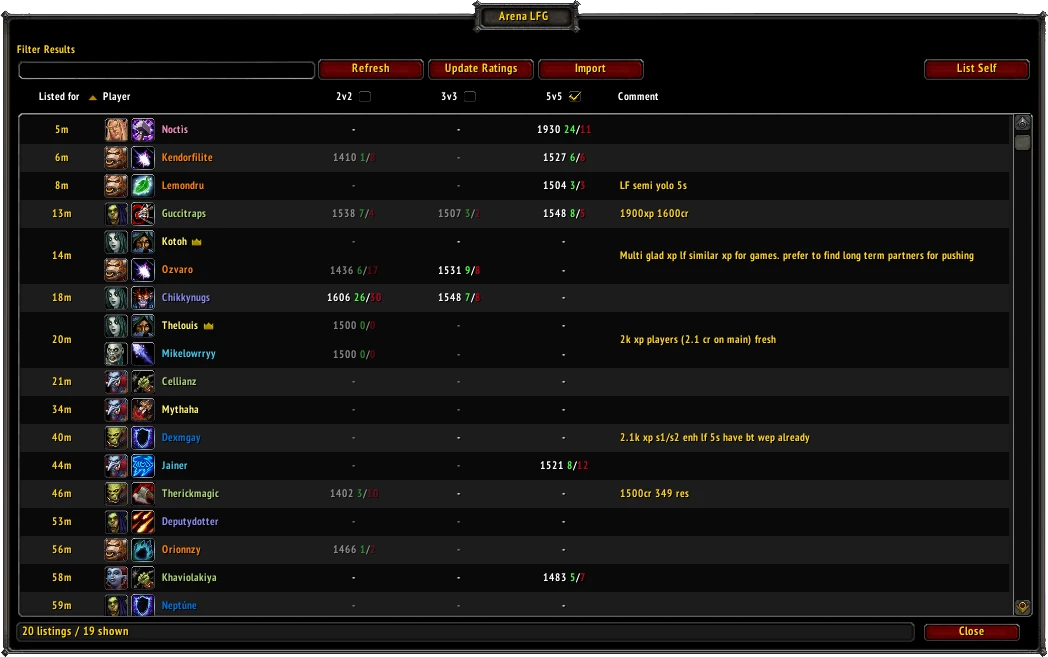
See each player's specialization, race and arena record directly in the Group Finder, so you can find the right teammates faster.
A quick round trip
The addon and website work together without asking you to configure accounts or API keys.
Refresh the in-game LFG browser and Arena LFG collects the players currently looking for partners.
Open a generated ArenaLFG.com link. Current listings are prioritized while older records fill the remaining request.
Copy the compact result into the addon and the table updates with the available character and arena data.
Designed for the decision
Search by player, class, race, specialization, comment or minimum rating. Group members stay together, while missing and unavailable data remain clearly distinguishable.
Built around arena LFG
Arena LFG keeps the original group finder workflow and adds the context needed to evaluate a partner.
Compare 2v2, 3v3 and 5v5 rating together with season wins and losses.
Recognize class, active specialization and race through compact icons and clear tooltips.
Multi-player listings remain grouped, with every available member shown inside the same result.
Filter by player, class, race, specialization, comment or a minimum arena rating.
Open the player menu to send a whisper or invite an eligible solo player without retyping a name.
Unknown, pending and unavailable bracket data stay visibly different instead of being shown as zero.
Compatibility
Installation
No Battle.net login, API key or external desktop application is required.
Download Arena LFG from its official CurseForge project page.
Launch Classic Anniversary, enable Arena LFG on the character selection screen and enter the game.
Click the minimap icon or type /alfg, then refresh the arena group finder.
Open the generated ArenaLFG.com URL, copy its result and paste it into the addon.
Data and freshness
Arena LFG uses public World of Warcraft data supplied by Blizzard. Leaderboards are synchronized on a schedule, while missing or outdated players requested from current LFG results receive priority.
The addon never asks for your Battle.net username, password or Blizzard API credentials.
Frequently asked questions
No. The website and addon never request your Battle.net credentials or a personal Blizzard API key.
The player is not stored yet, is waiting for a refresh or could not be found through the available public data.
Data is cached and refreshed periodically. A recent match, transfer, rename or specialization change may not appear immediately.
The export URL contains the region, realm and requested character names. The compact payload is encoded, not encrypted.
No. World of Warcraft addons cannot make arbitrary web requests, so you open the export URL and copy the result back into the game.
Run /alfg_wipe in game. This resets Arena LFG's local database for a clean import.

Available on CurseForge